Communication centre for Victron systems
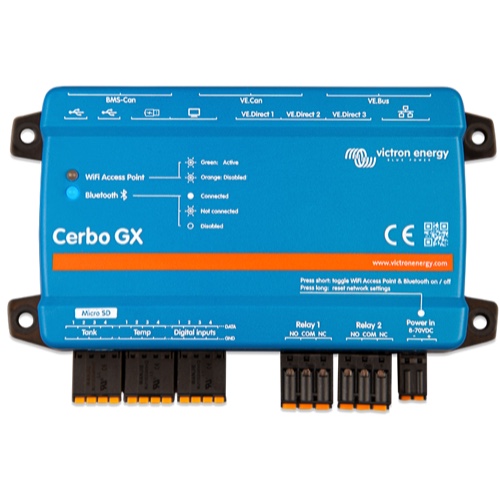
The Cerbo GX MK3 is the communication centre of a Victron Energy installation: it gives control over the system from anywhere while maximising its performance. The system can be reached through the Victron Remote Management (VRM) portal, or directly with the optional GX Touch display, a Multi Functional Display (MFD) or the VictronConnect app. Communication ports: 3 VE.Direct ports and 2 paralleled VE.Bus RJ45 sockets (both always isolated), VE.Can (VE.Can 1 isolated, VE.Can 2 non-isolated), BMS-Can (listed in the datasheet under VE.Can), a 10/100 Ethernet RJ45 socket, built-in WiFi, Bluetooth and 3 USB host ports. The supply voltage range is 8 – 70 VDC, with a power draw of 2.8 W @ 12 V without GX Touch.
Cerbo GX MK3 compared with the Cerbo GX MK2
Victron Energy offers the Cerbo GX in two versions, MK2 and MK3, described in the same datasheet. Depending on the load, the MK3 is three to four times faster than the MK2, which makes it suited, according to Victron, to systems that require maximum CPU performance, such as heavy Node RED automation or Signal K, especially when many devices are connected via VE.Direct and USB, when PV inverters are connected, or both. The maximum number of VE.Direct devices (devices connected directly plus devices connected over USB) is 25 on the MK3, against 15 on the MK2; according to the datasheet, this limit is mostly bound by CPU processing power. All the other values in the datasheet table (supply voltage, power draw, ports, inputs and relays, dimensions, operating temperature, IP rating and standards) are given as common to both versions.
Monitoring, control and maintenance via VRM
Once connected to the VRM portal, the complete installation can be followed in any web browser or in the VRM mobile app, and data is logged continuously, also when the internet connection is temporarily lost. VRM shows the battery state of charge, power consumption and the harvest from PV, generator and mains, as well as tank levels and temperatures, and reports alarms by email or push notification. From the same interface you can set the shore power input current limit, start and stop the generator, switch relays, adjust ESS settings and operate inverter/chargers. Diagnostics, firmware updates and VEConfigure changes can be carried out remotely, and the Remote Console gives full access to the Cerbo GX user interface over the internet, the local network or the Cerbo GX WiFi access point.
Inputs, relays, mounting and GX Touch displays
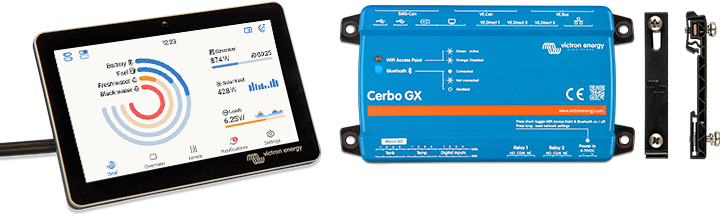
The Cerbo GX MK3 has 4 resistive tank level inputs, 4 temperature sense inputs, 4 digital inputs and 2 relays (NO/NC; DC up to 30 VDC: 6 A; DC up to 70 VDC: 1 A; AC: 6 A, 125 VAC). Relay 1 can be programmed as an alarm relay, for generator start/stop, a tank pump, a temperature-controlled relay or manual operation; relay 2 as a temperature-controlled relay or for manual operation. The unit measures 78 x 154 x 48 mm (h x w x d), operates from -20 to +50 °C, is rated IP20 and mounts on a wall or on a 35 mm DIN rail with the DIN35 adapter small (not included). The optional GX Touch 50 (800 x 480) and GX Touch 70 (1024 x 600) touch screens connect with a single 2 meter cable and exist in top/wall mount versions, IP54 without connectors, and in flush mount versions, IP65 when installed with the included rubber gasket. Bluetooth is intended for initial connection and network configuration with the VictronConnect app.